Bridges
Il NAM include un'ampia varietà di ponti per tutte le reti di trasporto e presenta decine di modelli e design personalizzati.
Questa documentazione non è ancora stata tradotta nella vostra lingua.
I contenuti di questo documento sono in fase di revisione e sono soggetti a modifiche.
Base Networks
The base networks include Street, Road, Avenue, One Way Road, Maxis Highways, Rail, and Elevated Rail.
Override Networks
The override networks include High Speed Rail, RealHighway, and the Network Widening Mod.
RealHighway
The NAM includes bridges for various RealHighway networks. However, a hardcoded restriction in the game’s terrain engine prevents bridges from being built without at least a one-tile separation between them, meaning some extra considerations must be taken to properly construct bridges:
- Bridges for RealHighway networks with separate carriageways (MIS Ramps, RHW-4, RHW-6S, RHW-8S, RHW-10S, and DDRHW-4) will have their traffic flow determined by the way in which the base network is dragged. Take note of the preview models to ensure you have built the bridge in the correct direction. These bridges use the RealHighway tool as expected.
- Bridges involving the multi tile S-type networks (RHW-8S, RHW-10S, RHW-12S) must be built with the Maxis Ground Highway tool instead of the RealHighway tool.
- Bridges for adjacent RHW-4 and RHW-6S networks are also built with the Maxis Ground Highway tool.
- Bridges involving the triple tile C-type networks (RHW-6C and RHW-8C) are not possible.
For the bridges that use the Maxis Highway as a base, there are overrides in place to seamlessly connect with the otherwise RealHighway-based networks. In order to create this smooth transition, ensure that only the end stub of the Maxis Highway network is showing at each end of the bridge. Then, simply drag each tile of the RealHighway override network into the Maxis Highway stubs. They will convert to match the RealHighway. This process is shown below.
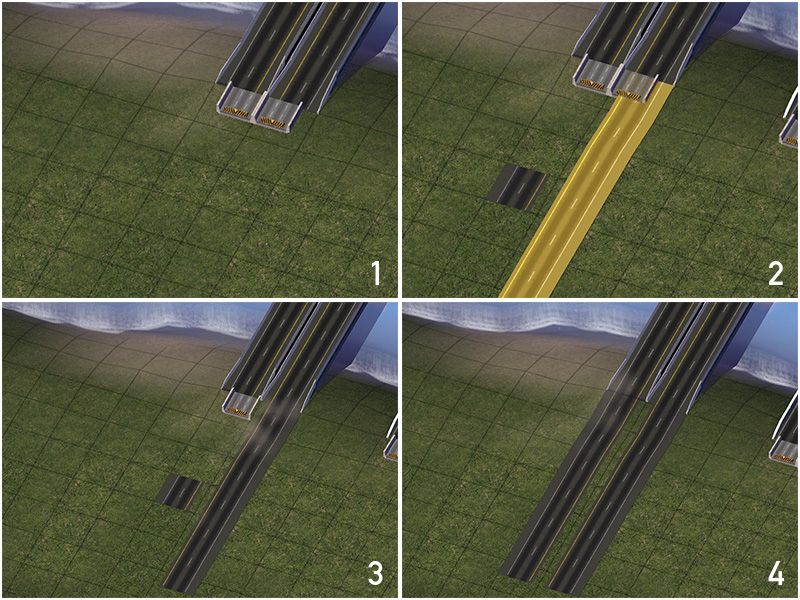
The following bridges are supported with the RealHighway tool:
| Bridge Type | Preview | MIS | RHW-2 | RHW-3 | RHW-4 | RHW-6S | DDRHW-4 |
|---|---|---|---|---|---|---|---|
| Viaduct |  | Yes | Yes | Yes | Yes | Yes | Yes |
| Red Deck Under Truss |  | No | Yes | Yes | Yes | No | No |
| Small Steel Arch |  | No | Yes | No | Yes | No | No |
| Plain |  | No | Yes | No | Yes | No | No |
| Concrete Girder |  | No | Yes | No | No | No | No |
| Steel Girder |  | No | No | No | Yes | No | No |
| Concrete Box Girder |  | No | No | No | Yes | Yes | No |
| V-Shaped Steel Girder |  | No | Yes | No | Yes | No | No |
| Yellow Steel Box Girder |  | No | Yes | Yes | Yes | No | No |
| Green Over Deck Truss |  | No | Yes | Yes | Yes | No | No |
| Blue Suspension |  | No | Yes | Yes | Yes | No | No |
The following bridges are supported from the Ground Highway tool:
| Bridge Type | Preview | RHW-4 | RHW-6S | RHW-8S | RHW-10S | RHW-12S |
|---|---|---|---|---|---|---|
| Viaduct |  | Yes | Yes | Yes | Yes | Yes |
| Cable Stayed |  | No | No | No | Yes | No |
| Maxis Highway Override |  | Yes | No | No | No | No |
| Plain Compact Suspension |  | Yes | No | No | No | No |
| Undertruss |  | No | No | Yes | No | No |
| Large Concrete Arch |  | No | No | No | Yes | No |
| Large Steel Arch |  | Yes | No | No | No | No |
| Compact Cable Stayed |  | No | Yes | No | No | No |
| Compact Steel Arch |  | No | Yes | No | No | No |
| Steel Girder |  | Yes | No | No | No | No |
| Dual Steel Girder |  | Yes | No | No | No | No |
| Compact Regular |  | No | Yes | No | No | No |
| Compact Concrete Box Girder |  | No | Yes | No | No | No |
| Red Steel Arch |  | No | No | No | Yes | Yes |